L-MOUNT Forum

Register a free account now!

If you are registered, you get access to the members only section, can participate in the buy & sell second hand forum and last but not least you can reserve your preferred username before someone else takes it.

Struggling with S5IIX V-Log Colors – Looking for Color Grading Advice

hugo.ckw

New Member
Joined
Jul 13, 2026
Messages
7
Hi everyone,

Could I please get some advice on V-Log color grading?

I'm currently shooting with a Panasonic S5IIX in V-Log using the Sigma 24–70mm lens, and I've been struggling with the colors. For some reason, the footage often looks a little green and somewhat artificial to me (although it could just be the way I'm seeing it). I've also been struggling to achieve the more cinematic look that I'm aiming for.

Unfortunately, I can't upload comparison images yet since this is my first post in the community.

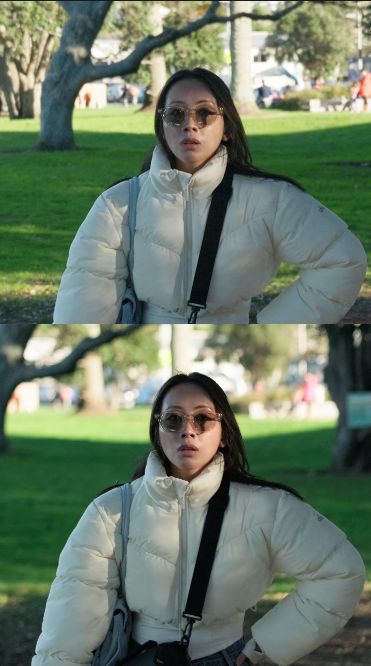
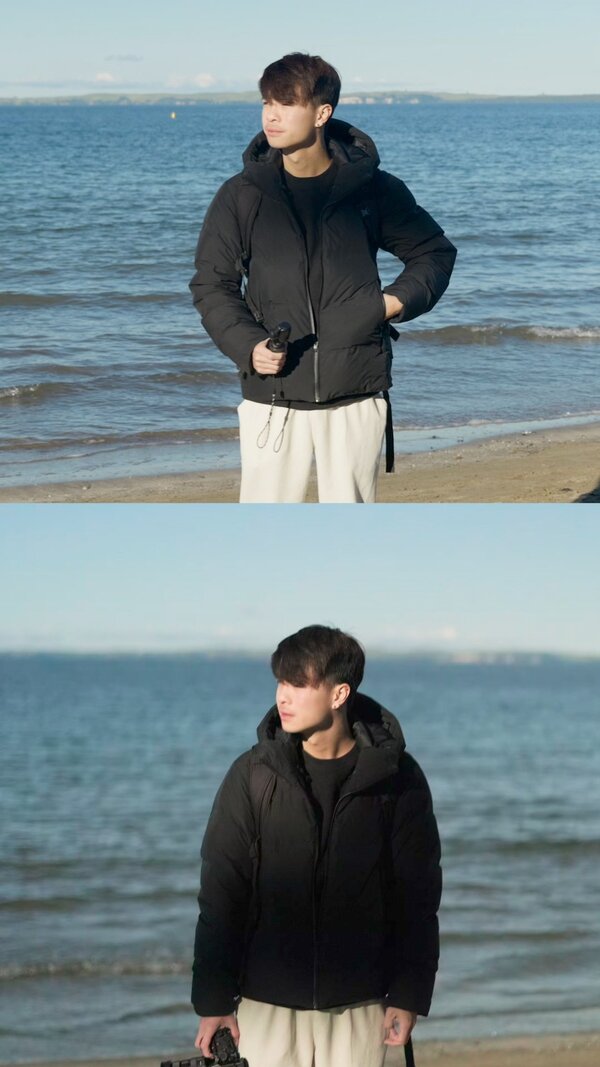
I did a side-by-side comparison with my Fujifilm X-T4. The only thing I forgot to match was the aperture: the Fujifilm was shot at f/1.4, while the S5IIX was at f/2.8.

The images I compared were simply frames cropped from the videos, and the only processing I've done is converting the log footage to Rec.709—no additional color grading has been applied.

Compared to the Fujifilm, the S5IIX footage looks much more washed out, slightly green, more artificial, and has much harsher contrast. In comparison, the Fujifilm footage has richer, more vibrant colors, softer contrast, and an overall more cinematic feel.

I'm shooting in V-Log without any special settings, so I'm wondering if there's something I'm doing wrong or if I'm missing part of the workflow. I know this isn't a perfectly fair comparison because of the different apertures, but the difference in color and overall look seems much greater than I'd expect from the f-stop alone.

I'd really appreciate any advice or suggestions. Thanks!
 
I assume if you watch your footage in-camera it looks fine?

I had a similar problem. I found out, that the issue was the editing software I was using.
You can download a trial of another software and check, if your footage looks better there as 1st troubleshooting step.
 
I'm using DaVinci Resolve Studio, so I'm not sure if the software would cause such a big difference, but it's definitely something worth checking. From what I can tell, the footage looks pretty similar on the camera screen as well. That said, it's sometimes hard to judge color accurately on such a small display, especially when I'm trying to achieve a specific look.
 
From what I can tell, the footage looks pretty similar on the camera screen as well.

Ok, at this point I think the software is not causing the issue. Don't you have the possibility to share a screenshot?
 
These are my screenshots. I hope they manage to upload.
 

Attachments

  • Girl in park 2.png
    Girl in park 2.png
    539.6 KB · Views: 13
  • Girl in park.png
    Girl in park.png
    444.7 KB · Views: 15
  • Timeline 1_00000045.jpg
    Timeline 1_00000045.jpg
    185 KB · Views: 13
To my eye, the scenes recorded on the beach look very similar in terms of tint. I don't see a green cast in them. The lighting on the black jacket & white pants is too different for me to determine anything about "richness, vibrance, contrast", let alone "cinematic" (whatever that means). His face & hair looks essentially identical.

The white balance in the "girl in park" (hand on hip) images look very slightly different, and can probably be made to look essentially identical in post.

The "girl in park 2" Fujifilm image is completely out of focus (obviously less "sharp"), and the S5iiX frame is more in focus on the girl. The Fujifilm frame has more lens flare, which lowers the contrast. She has a different pose in each frame, affecting the lighting, and thus the contrast. The exposure in the S5iiX frame is brighter than the Fuji frame, making the Fuji frame look duller (less contrasty).

So ... if nothing else this is a good demonstration of how difficult it is to do a useful side-by-side multiple camera comparison. The frames have to be recorded at the exact same moment (both cameras rolling at the same time). The cameras have to be positioned so the lenses are right next to each other, so the POV/angle is as identical as possible. The lenses have to be identical make & model (lenses have different color cast, contrast, sharpness, etc. characteristics), and they must be set to the same or equivalent focal length & aperture. Exposures must match, so adjust ISO as required. ND filters can have color casts, so if used, use the exact same filter on both cameras. Variable ND filters can have variations in tint, contrast, etc. depending on how they're set. Plus a million other variables.

Manual WB set the "same" on both cameras (such as a standard "daylight" setting, etc.) may yield slightly different color casts visible in post, because sensors and camera "color science" varies. Software such as Davinci Resolve Studio can almost always be used to "correct" minor WB differences.

The S5iiX has a WB adjustment feature available for all its WB settings. For example, if its standard "daylight" WB is too green for your taste, you can adjust it toward blue or whatever. If possible test playback on a calibrated monitor, or if not available, playback on several different make/model monitors, to see if you're making things better or worse. Good luck. Cheers.
 
Last edited:
I must admit I agree with @PJD

Do you know that VLOG needs to be a little overexposed? I mostly overexpose +1EV and get very good results. Also a precise white balance is essential.
 
  • Like
Reactions: PJD
The basics of the workflow really matter.

-Did you white balance to a grey card and or shoot a chip chart?
- I would not start the grading process by adding a REC.709 conversion.
- Do you know how to set up color management correctly in Resolve Studio?
 
To my eye, the scenes recorded on the beach look very similar in terms of tint. I don't see a green cast in them. The lighting on the black jacket & white pants is too different for me to determine anything about "richness, vibrance, contrast", let alone "cinematic" (whatever that means). His face & hair looks essentially identical.

The white balance in the "girl in park" (hand on hip) images look very slightly different, and can probably be made to look essentially identical in post.

The "girl in park 2" Fujifilm image is completely out of focus (obviously less "sharp"), and the S5iiX frame is more in focus on the girl. The Fujifilm frame has more lens flare, which lowers the contrast. She has a different pose in each frame, affecting the lighting, and thus the contrast. The exposure in the S5iiX frame is brighter than the Fuji frame, making the Fuji frame look duller (less contrasty).

So ... if nothing else this is a good demonstration of how difficult it is to do a useful side-by-side multiple camera comparison. The frames have to be recorded at the exact same moment (both cameras rolling at the same time). The cameras have to be positioned so the lenses are right next to each other, so the POV/angle is as identical as possible. The lenses have to be identical make & model (lenses have different color cast, contrast, sharpness, etc. characteristics), and they must be set to the same or equivalent focal length & aperture. Exposures must match, so adjust ISO as required. ND filters can have color casts, so if used, use the exact same filter on both cameras. Variable ND filters can have variations in tint, contrast, etc. depending on how they're set. Plus a million other variables.

Manual WB set the "same" on both cameras (such as a standard "daylight" setting, etc.) may yield slightly different color casts visible in post, because sensors and camera "color science" varies. Software such as Davinci Resolve Studio can almost always be used to "correct" minor WB differences.

The S5iiX has a WB adjustment feature available for all its WB settings. For example, if its standard "daylight" WB is too green for your taste, you can adjust it toward blue or whatever. If possible test playback on a calibrated monitor, or if not available, playback on several different make/model monitors, to see if you're making things better or worse. Good luck. Cheers.
Thank you for the insight. That is very helpful! I will do another comparison this weekend, going to make sure to set the settings correctly this time. I will come back and let you know the result
 
  • Like
Reactions: PJD
I must admit I agree with @PJD

Do you know that VLOG needs to be a little overexposed? I mostly overexpose +1EV and get very good results. Also a precise white balance is essential.
I don't know that needs to be a bit more exposure, like how much? I was trying to film at the lowest ISO possible.
 
The basics of the workflow really matter.

-Did you white balance to a grey card and or shoot a chip chart?
- I would not start the grading process by adding a REC.709 conversion.
- Do you know how to set up color management correctly in Resolve Studio?
1. I didn't shoot with a grey card this time. I was shooting with 5600k white balance for both cameras.
2. For this footage, I didn't grade anything yet, mainly just converting by using CST to compare the color differences.
3. I do have a basic understanding of color grading. I tried to learn color grading in Lightroom before, and I can get the color I wanted. But when I tried to do color grading using V-log, I struggled very much. My goal is to be able to create the 60 30 10 color in my footage, and I am still learning how to do it.
 
- Do you know how to set up color management correctly in Resolve Studio?
I have been color grading log video for many years, and with DaVinci Resolve ever since it has become a general video editing program. And I've tried several color management approaches with Resolve. The most dependable and consistent I use is ACES color science, and then I select the camera specific ACES Input Transform. For Panasonic cameras use Panasonic Varicam VLog. Resolve does list Fujifilm Log Input Transforms, but I don't know which one applies to the X-T4. For the ACES Output Transform it is okay to select a Rec.709 transform, although for my work I always use a Rec.2100 ST2084 transform.

I recognize lots of Resolve users will debate my approach, but in my view it is the most consistent and reliable way to go. I've coached other Resolve users and this gets them out of any color management struggles they've had.

ACES is not a magic bullet that makes all cameras look the same. Every camera maker has their own color science. But ACES does get you to good color management starting point if you are working with two or more different brands on a shoot.
 
  • Like
Reactions: PJD
I don't know that needs to be a bit more exposure, like how much? I was trying to film at the lowest ISO possible.
For Log video forget about the camera exposure meter. You generally expose to just below where the brightest highlights saturate. The best tool for this an the S5IIX is the waveform monitor. With experience you will learn to use the waveform monitor somewhat smarter than this, but for most scenes just below saturation is the best approach. Again, the camera exposure meter is not a good tool for VLog (or any log) exposure. Forget you have it.

(The latest Lumix cameras have a False Color tool, which is generally better than the Waveform monitor, but as far as I know the S5IIX does not have this.)
 
  • Like
Reactions: PJD
Back
Top