L-MOUNT Forum

Register a free account now!

If you are registered, you get access to the members only section, can participate in the buy & sell second hand forum and last but not least you can reserve your preferred username before someone else takes it.

Davinci Resolve (Studio) Beta 3 now supports Lumix Raw Files

Nevyn72

Well-Known Member
Joined
Apr 6, 2023
Messages
1,051

Davinci Resolve (Studio) Beta 3 now supports Lumix Raw Files​

I just tried it out, it works quite nice (I still have a lot to find out), but because I'm already a Davinci Resolve Studio user so i'm a happy camper right now.
Note: I understand that If you use the free version you might have some resolution limits, but for studio users this is not a issue ofcourse.

I used a photo from last year as a test:
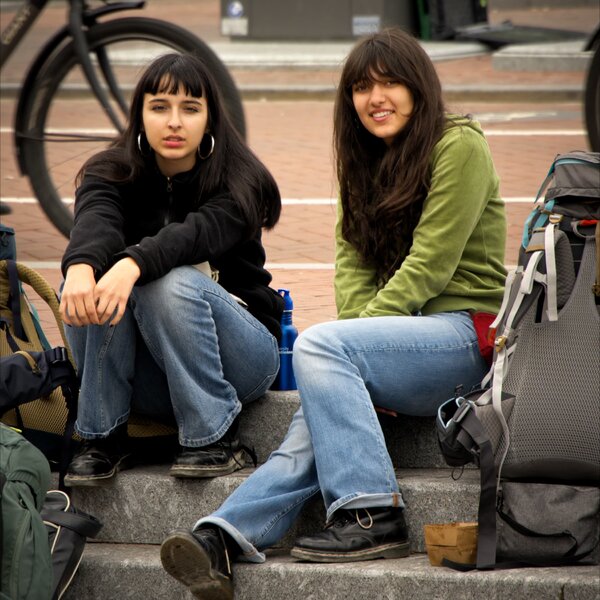
Photo Album 1 - 01.jpg
 
And on my PC atleast, it is silky silky SILKY smooth in performance
 
Excellent pice of news, John!! I was wondering how it is possible that the raw files from Lumix were not supported yet, bearing in mind that Blackmagic belongs to the L-Mount Alliance long ago... Have you tried to color grade photos? Do you think that it could be better than Lightroom? I am very used to merge photos in Lightroom, and I don't think that DaVinci Resolve Studio offers that already, right? For me will be a very slowly change from LR to DRS fully photo edition. I still have the DRS 20 version, I did not download the 21 yet.
 
Very good news. I haven't downloaded the beta version of Davinci Resolve Studio 21 yet. I usually wait until the beta is closer to the final release version, or (in this case) the final "21.0" release. That's just me. YMMV. It's great to have another option for Lumix RAW stills processing!
 
Thanks @Nevyn72, I don't know where I have been. DaVinci Resolve 21 looks like a fantastic release all around. I just downloaded the beta, but I likely won't get into it until I have time to give it serious attention. So many new features - my gosh. About editing photo RAW, I use photos quite a bit in video so my first thought is to do this directly in RAW. I edit both the photos and video clips in HDR, and it can sometimes be a hassle to get the same look between the two. I'm expecting there will be enough control with nodes to make this go well. I currently edit the photos in Lightroom HDR, export in a video compatible HDR format and import this into DaVinci Resolve. So there can be some back and forth, and there could be a big workflow win.
 
FYI: The final shipping versions (not beta) of Davinci Resolve 21.0 (free), and Davinci Resolve Studio 21.0 (free upgrade for exiting DRS users, or $300 new) are now available for download on Blackmagic Design's website:

As noted in the installation instructions, before installing I backed-up all my project & project database files. I haven't taken the new version for a much of a spin, so can't comment on its new features or performance yet. Cheers.
 
As noted in the installation instructions, before installing I backed-up all my project & project database files.
I've been using DaVinci Resolve for years and years, and perhaps sadly I've never heeded that warning to back up all these files. And never had an issue (if a file needs upgrading it will do it if/when needed). Anyway, thanks for the reminder, I'll upgrade to 21.0 and try it.
 
FYI: On MacOS 26.5.1, copyright metadata in Panasonic .RW2 photos don't export out of DRS 21.0. My camera is a Lumix S5iiX.

I did select the option on the Deliver page to export a photo's metadata, and other metadata does export (such as aperture, shutter speed, etc.), but the camera's copyright field data doesn't export to TIFF & PNG files at least.

Apple Preview, Pixelmator Pro, and Affinity Photo are able to display the copyright metadata for the original .RW2 photos. But after processing in DRS 21.0 the copyright metadata is gone.

I've reported this bug to Blackmagic. Cheers.
 
I'm using it a lot now - it works really flawlessly with grading pictures. Superfast and great quality.
I am missing a lot of features stil. The biggest problem: Export is missing a lot options like proper filename generation, automatic resizing at a lot of other features.
But because I already have the studio version, and the grading and image manipulation tools work so well, I am ok with that.
I do hope that the export does get extra options soon in a future release.

And what @PJD said I also agree with, no (c) information, but for me as a hobbiest that is not a big deal.
Photo Album 1 - 005.jpg
Photo Album 1 - 021.jpg
Photo Album 1 - 034.jpg
 
I'm using it a lot now - it works really flawlessly with grading pictures. Superfast and great quality.
I am missing a lot of features stil. The biggest problem: Export is missing a lot options like proper filename generation, automatic resizing at a lot of other features.
But because I already have the studio version, and the grading and image manipulation tools work so well, I am ok with that.
I do hope that the export does get extra options soon in a future release.

And what @PJD said I also agree with, no (c) information, but for me as a hobbiest that is not a big deal.

Yes, DRS 21 currently not exporting a photo with the same filename as the original source photo, by default, is REALLY odd. Hopefully they fix that soon. One can specify a custom filename using the Deliver page, but that's not the same thing.

Especially since Davinci has long had the option to export individual VIDEO clips from an edit timeline so the exported clips have the same name as the source clips. This gives me hope that the exported photo name bug is something they'll soon fix.

The photo copyright metadata export bug is a bit different in that it's never been a DRS video feature. But in hindsight it seems odd it's not been in there all along. I mean, embedding copyright metadata for video seems like it would be just as important for video as for photos. In fairness, I didn't notice this until they added photo editing in DRS 21.

I also submitted a feature request that they add more cropping aspect ratios to the crop pull-down menu (for example, the same ones listed in the GUIDES overlay menu should be added to the cropping menu). And also allow you to enter any 2 numbers, such as 65 and 24 (for Xpan), for custom aspect ratios.

Unsurprisingly, Blackmagic is receiving a LOT of feature suggestions (on their user forum) for Davinci's new photo module. It'll be interesting watching the software's evolution.
 
Last edited:
It'll be interesting watching the software's evolution.
For sure. Also interesting, how many photographers will start using it for their RAW processing, and maybe drop their current photo editing software? DaVinci Resolve is undoubtedly the best color grading software, but how many photographers want such high capability color grading? In the movie world the right color artist with the right software can make or break a film. But for photography? I expect Black Magic is just getting started at this, and if they advance and revolutionize with photography what they have done with the movie industry, as you say it will be interesting to watch.

DaVinci Resolve Studio is a little expensive at $325 US, but it is lifetime and I've had regular free updates for I don't know how many versions over the years since I bought it. And you can start with the free version to see if you like it.

I hope those here using the software will post their work now and then on this thread. And discuss new features and new capabilities as they come along, to educate and drum up interest with L Mount users. We have the best cameras, why not the best software?
 
I have to admit, I’ve avoided learning about color grading for photography, but it’s been on my list. I’m sure it’s useful for ensuring that a set of images have a consistent mood or style. I suspect many photographers do this via the in-camera style (particularly Fuji shooters) but then you have to be satisfied with OOC JPEGs. And then of course we have LUTs now - am I correct in assuming that a LUT does something at least similar to color grading?

OK, the Duck.ai assistant says that LUTs can be a good start (we’re talking video now) but that color grading still gives more control over the final product, which makes sense.

Anyway, sounds like a good topic to learn about. I found a short tutorial for color grading in Capture One:


I’m sure Resolve takes it further, and, yes, it will be interesting to see how this all shakes out. I know that Capture One has had decreased earnings and that the main owners of C1 are looking to sell it (and Phase One).
 
Yes, DRS 21 currently not exporting a photo with the same filename as the original source photo, by default, is REALLY odd. Hopefully they fix that soon. ...
Apparently, it's currently a feature, not a bug. :)

If you type a "%" character in the export dialog box "File name" field, you can select "Source Name" (and/or MANY other phrases) from the pop-up menu. Can be used to export individual photos, or groups of photos, so the exported file names include the source name(s). Sweet.
drs-21-photo-export-w-source-name.jpg
 
I have to admit, I’ve avoided learning about color grading for photography, but it’s been on my list.

Good thoughts George. I have friends in the movie business, and they might throw on LUTs for an early cut, but not consider it for final color, but go for full color grading. It is kind of like the music in a movie - you don't much think of the music when you watch a movie, but it is an extremely important element. They think of color in the same way, to set the mood as the movie progresses. But I've never related this much to photography. This is definitely the way Lumix is progressing with their current approach with LUTs - to not just affect the look of the photo, but to affect the feel.

On this forum it seems Paul has been working for the feel in his photos, and he may have a head start over the rest of us here.

It could be DaVinci Resolve is developing a good platform to explore this aspect of photography.
 
Good thoughts George. I have friends in the movie business, and they might throw on LUTs for an early cut, but not consider it for final color, but go for full color grading. It is kind of like the music in a movie - you don't much think of the music when you watch a movie, but it is an extremely important element. They think of color in the same way, to set the mood as the movie progresses. But I've never related this much to photography. This is definitely the way Lumix is progressing with their current approach with LUTs - to not just affect the look of the photo, but to affect the feel.
Indeed.

On this forum it seems Paul has been working for the feel in his photos, and he may have a head start over the rest of us here.
Yes, I have noted that myself!
 
Apparently, it's currently a feature, not a bug. :)

If you type a "%" character in the export dialog box "File name" field, you can select "Source Name" (and/or MANY other phrases) from the pop-up menu. Can be used to export individual photos, or groups of photos, so the exported file names include the source name(s). Sweet.
View attachment 17714
Thanks Peter, happy with this
 
I was finally able to download DaVinci Resolve Studio 21 and I've been playing with a couple of photos. From the point of view of color grading it is really spectacular. On the other hand it is quite difficult to change the aspect ratio of the photos and try to set something similar to the 65:24 Xpan, at least for me. And I can't find the possibility of merging two images. Another thing that is impressive is the effectiveness of the effects, such as extra sharpness or noise reduction, etc... In any case, I think it's a good thing that DVRS21 incorporates the possibility of editing photos, especially from the point of view of creating LUTs and adjusting the colorization of clips in the timeline.

I can't post any photos now because of the resolution issue in the forum, but if I put one on Flickr I'll put the link.

Another thing, I have opted for the subscription of 6 euros per month for Blackmagic Cloud service. It is the lowest rate in Europe and I will use it for important professional projects. I want to have availability and security so that I don't lose those projects if some eventuality happens with storage, which you never know...
 
... On the other hand it is quite difficult to change the aspect ratio of the photos and try to set something similar to the 65:24 Xpan, at least for me. ...
I hear you! I hope Blackmagic adds more flexible aspect ratio capabilities to the Photo page crop function soon. On a related note, the Photo page "rulers", when in percentage mode, make no sense to me ... but I tend to be maths challenged, so there's that. :)
 
So now there's a Davinci Resolve Studio (and non-Studio) update, to version 21.0.1, available for download from Blackmagic's Support website.

It addresses various bugs, and adds a few features. Unfortunately for me it doesn't seem to have a feature I requested (crop a photo to a custom aspect ratio by entering two values, such as "65" and "24" for Xpan.) And I continue to be mystified by its pull-down "Viewer Guides" menu (selecting any of the "Broadcast and Film" choices doesn't seem to do anything.) It's probably user error on my part, so I'll research further ...
 
Last edited:
Back
Top